Dark Widow: Integrating Gothic Horror Typography into Professional Design Workflows
In the landscape of digital design, typography is rarely just about readability; it is a primary vehicle for tone, atmosphere, and psychological impact. For professionals in horror, thriller, or dark fantasy genres, selecting the right typeface is a critical decision that can make or break a project’s aesthetic coherence. Dark Widow has emerged as a specialized tool for designers seeking to inject a visceral, unsettling energy into their work. Unlike standard sans-serif or serif fonts designed for neutrality, Dark Widow draws its inspiration from old traditional Gothic fonts but reinterprets them through a lens of decay and menace.
This article explores how to effectively integrate Dark Widow into professional workflows, from initial concept development to final asset preparation. We will examine its visual characteristics, practical use cases, compatibility with other design tools, and strategies for maintaining consistency across multi-platform projects. Whether you are a graphic designer, a self-published author, or a marketing specialist creating content for niche audiences, understanding the mechanics of this font will help you leverage its unique qualities without compromising overall design quality.
Understanding the Visual Architecture of Dark Widow
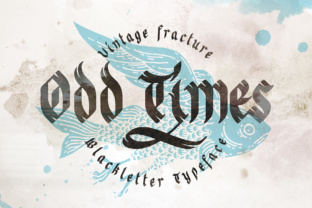
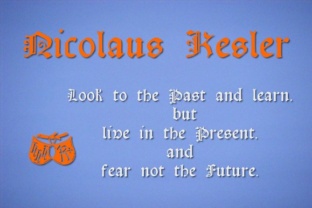
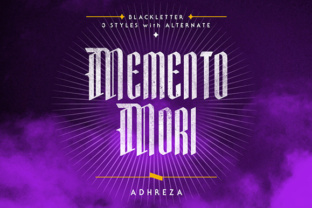
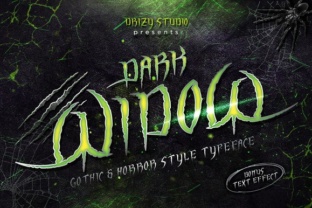
To use any typeface effectively, one must first understand its structural DNA. Dark Widow is not merely a decorative font; it is a highly detailed expression of the Gothic tradition. It draws direct inspiration from old traditional Gothic fonts, which historically feature heavy vertical stress, intricate serifs, and complex letterforms. However, Dark Widow diverges by introducing a layer of intentional imperfection.
The defining characteristic of this font is its texture. The edges of every letter are scratchy, giving the font a unique look that suggests age, damage, or supernatural origin. This "scratchiness" is not random noise; it is a deliberate stylistic choice that adds depth and character. The font creates loads of details within each glyph, meaning that at smaller sizes, these details may blur together, but at larger display sizes, they become distinct textural elements that draw the eye.
For designers, this presents both an opportunity and a constraint. The high level of detail makes Dark Widow excellent for headlines, titles, and logos where scale allows the texture to shine. Conversely, using it for body text requires careful consideration of line height, color contrast, and spacing to ensure legibility remains intact. Understanding these physical attributes is the first step in planning a project around this specific typeface.
Strategic Placement in the Creative Process
Integrating Dark Widow into a workflow requires timing. It is rarely a background element; it is typically a foreground statement. Here is how it fits into various stages of creative production:
Conceptualization and Mood Boarding
During the early stages of a project, such as book cover design or game asset creation, Dark Widow should be tested alongside complementary imagery. Because the font carries such strong emotional weight, it sets the tone immediately. When building mood boards, include samples of Dark Widow to assess how its scratchy, Gothic aesthetic interacts with photographic textures, digital paintings, or vector illustrations. Ask yourself: Does the font enhance the horror theme, or does it clash with softer visual elements?
Design Execution and Hierarchy
In the execution phase, Dark Widow serves best as a headline or display font. Use it to establish visual hierarchy. For example, in a movie poster or a blog post header, the title might be set in Dark Widow to grab attention, while the subtitle and body copy remain in a clean, neutral sans-serif or serif font. This contrast ensures that the audience can read the necessary information quickly while still feeling the atmospheric pull of the main title.
- Primary Headlines: Maximize the impact of the scratchy edges by using large point sizes.
- Secondary Accents: Use sparingly for pull quotes or section dividers to maintain visual interest without overwhelming the reader.
- Body Text: Generally avoid using Dark Widow for paragraphs. Its complexity reduces reading speed and causes eye fatigue over long durations.
Review and Quality Control
Before finalizing assets, review the typography in context. Check for kerning issues, particularly with letters that have sharp points or overlapping strokes. The scratchy edges can sometimes create optical illusions where letters appear to vibrate or merge if placed too close together. Adjust tracking (letter-spacing) to give the font room to breathe, ensuring that the intricate details are visible rather than muddy.
Compatibility and Technical Implementation
Seamless integration depends on technical preparedness. Dark Widow, like many specialized display fonts, requires proper handling to function correctly across different platforms and mediums.
File Formats and Licensing
Ensure you have the correct license for your intended use. Commercial projects, such as published books or branded merchandise, often require separate licensing from personal or editorial use. Once licensed, save your files in appropriate formats. For print, use high-resolution PDFs or TIFFs to preserve the fine scratchy details. For web use, consider converting the text to outlines (vector paths) if the font needs to be embedded strictly for visual fidelity, though this increases file size and removes accessibility benefits. Alternatively, use @font-face rules with WOFF2 formats to ensure cross-browser compatibility.
Color and Contrast Management
The effectiveness of Dark Widow is heavily dependent on contrast. Due to its black-and-white, high-contrast nature, it performs best against solid backgrounds or textured surfaces that do not compete with its own texture. Avoid placing Dark Widow over busy photographic backgrounds unless you apply a drop shadow, stroke, or semi-transparent overlay to separate the text from the image. This technique enhances legibility while preserving the font’s eerie aesthetic.
Workflow Efficiency and Asset Organization
For freelancers and agencies managing multiple projects, efficiency is key. Incorporate Dark Widow into your asset management system strategically.
- Create Style Guides: Document how Dark Widow is used in your brand or project. Specify minimum font sizes, allowed colors, and pairing recommendations. This prevents inconsistent usage across team members.
- Use Character Sets Wisely: Not all Gothic fonts include extensive punctuation or special characters. Verify that your version of Dark Widow includes the symbols you need (such as ampersands, dashes, or quotation marks) to avoid having to substitute missing glyphs with inferior alternatives.
- Layer Management: In software like Adobe Photoshop or Illustrator, keep your typography on separate layers and group them logically. Name your layers clearly (e.g., "Title_DarkWidow") so that future edits are straightforward. This is crucial when collaborating with other designers who may need to adjust the text later.
Common Pitfalls and How to Avoid Them
Even experienced designers can misstep when working with expressive typefaces. Here are common errors associated with Dark Widow and how to mitigate them:
Overuse: The most frequent mistake is using Dark Widow everywhere. If every element on a page uses the same intense font, the design loses focus and becomes visually chaotic. Reserve Dark Widow for moments of maximum impact. Let other elements serve as supporting cast.
Neglecting Scalability: As mentioned, the scratchy details can disappear at small sizes. Always preview your design at actual output dimensions. A title that looks impressive at 500 pixels wide may become illegible at 50 pixels on a mobile device. Test responsiveness early in the workflow.
Inconsistent Pairing: Pairing Dark Widow with another ornate or script font can result in a cluttered, unprofessional look. Stick to simple, geometric, or humanist sans-serifs for complementary text. The simplicity of the partner font allows the complexity of Dark Widow to stand out without competition.
Long-Term Value and Adaptability
Investing time in mastering Dark Widow pays dividends in projects that require a strong, memorable identity. Its Gothic roots give it a timeless quality, while its modern execution keeps it relevant in contemporary digital spaces. As trends shift towards more immersive and atmospheric user experiences, fonts that evoke emotion and narrative will remain valuable assets.
By treating Dark Widow not just as a font but as a strategic component of your design process, you can elevate your work from functional to unforgettable. Focus on preparation, respect the limitations of the typeface, and always prioritize the user’s experience. When used correctly, the scratchy, detailed edges of Dark Widow will not just decorate your project—they will haunt it in the best possible way.
For further exploration, experiment with blending modes, opacity adjustments, and texture overlays to customize the appearance of Dark Widow to fit specific project needs. The goal is not to replicate existing designs but to harness the unique power of this Gothic-inspired typeface to tell your story more effectively.