School Globe Shaker Laser Cut Design
If you have ever watched a child shake a snow globe, you know the immediate sense of wonder it creates. The tiny pieces floating in suspension capture attention instantly. Now, imagine replicating that tactile, interactive magic using laser-cut materials for a desk ornament or a classroom display. That is exactly what the School Globe Shaker Laser Cut Design from Mango Studio offers. It is not just a static image; it is a meticulously crafted digital file designed to create a premium, multilayered 3D effect that moves.
This design bridges the gap between educational decor and high-quality craftsmanship. Whether you are a small business owner looking to expand your inventory of teacher gifts, an educator wanting to make your classroom more engaging, or a hobbyist eager to test new laser cutting techniques, this project provides a structured yet creative pathway. The result is a sophisticated piece that looks as good as it functions, combining the aesthetic of a world map with the playful mechanics of a shaker toy.
Understanding the Construction: Why Layers Matter
The success of any shaker design lies in its engineering. A common mistake beginners make is assuming that simply cutting out shapes and gluing them together will work. Without proper spacing, the internal elements jam, stick, or fail to move freely. This specific design addresses that challenge by defining precise material thicknesses to ensure smooth operation.
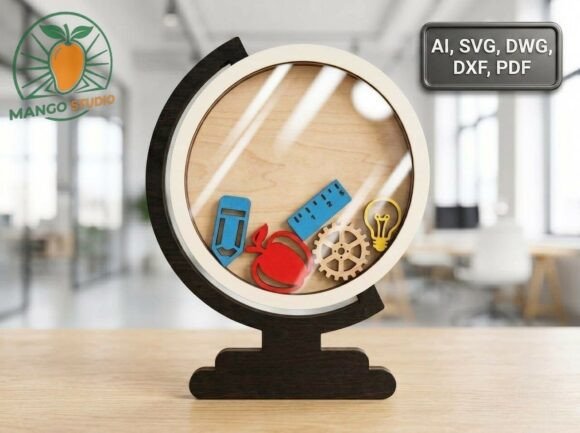
To achieve the professional look shown in the preview, the design relies on a three-layer architecture:
- 3 mm Plywood: This sturdy material forms the front decorative frame, the back panel, and all the internal shaker elements (icons). The thickness provides weight and durability, ensuring the piece feels substantial rather than flimsy.
- .4 mm Plywood: This thin layer acts as the middle spacer. Its primary job is to create a deep internal cavity. This depth is critical because it gives the small icons enough room to tumble without getting trapped against the front or back panels.
- 2 mm Acrylic: Used for the transparent front window, this recessed acrylic piece offers a clean, premium finish. Unlike standard glass or plastic, acrylic cuts cleanly on most laser cutters and provides excellent clarity, allowing the viewer to see every moving part clearly.
By specifying these exact measurements, the designer removes the guesswork. You do not need to experiment with different wood types to find the right fit; you simply follow the recommended specs, and the mechanical interaction works as intended.
Real-World Applications: Where This Design Fits In
While the concept sounds like a simple craft project, the versatility of the School Globe Shaker Laser Cut Design allows it to serve multiple roles across different sectors. Here is how various users can apply this resource in their daily workflows.
For Educators and Schools
Teachers are always looking for ways to make learning geography and global studies more tangible. A static poster on the wall is easily ignored. However, a desk ornament featuring continents, oceans, and landmarks that shift when tilted becomes a conversation starter. It serves as a visual aid that reinforces spatial awareness. Furthermore, because the design includes "school-themed" elements, it aligns perfectly with curriculum goals regarding world cultures and geography. It transforms a abstract concept into a physical object students want to touch and explore.
For Teachers’ Gifts and End-of-Year Tokens
Finding a meaningful gift for teachers can be difficult. Generic mugs and pens often end up discarded. A handmade, laser-cut globe shaker stands out because it is unique, personal, and durable. For parent-teacher associations or student groups, commissioning or creating these items adds a layer of thoughtfulness that mass-produced items lack. The "School Globe" theme makes it specifically relevant to the recipient’s profession, showing that the giver put effort into selecting something appropriate.
For Small Business Owners and Etsy Sellers
If you run a digital download shop or a physical craft store, this design fills a niche for high-value, low-volume items. Digital files for laser cutters are in high demand among makers who own machines but lack design skills. By offering this ZIP archive, which includes ten vector formats (AI, SVG, DWG, DXF, PDF, and more), you cater to a wide range of technical preferences. For those selling physical products, the clear instructions on material usage allow for consistent quality control, reducing returns due to broken mechanisms.
For Corporate and Office Decor
Global companies, travel agencies, and consulting firms often deal with international clients. Placing a globe shaker on a reception desk or in a conference room subtly communicates a global mindset. It is a modern, artistic take on traditional office decor. The sleek acrylic front and natural wood tones fit well in contemporary office environments, adding a touch of sophistication without being overly loud.
Technical Ease and File Compatibility
One of the biggest barriers to entry for laser cutting projects is file compatibility. Not everyone uses the same software. Some prefer Adobe Illustrator, while others rely on free tools or AutoCAD. The School Globe Shaker Laser Cut Design solves this by including a comprehensive ZIP archive with ten different vector formats.
This variety ensures that whether you are using CorelDRAW, Inkscape, LightBurn, or standard CAD software, you can open and edit the files without conversion errors. The inclusion of AI and SVG formats also benefits web designers who might want to use the vector paths for other digital projects before committing to physical production.
Additionally, the design features a convenient top feeding slot. This is a practical detail that many overlook until assembly. It allows you to insert or swap the shaker elements easily after the main structure is assembled. This means you can customize the interior icons—adding specific countries, holidays, or motivational words—without having to disassemble the entire unit. It turns a finished product into a customizable template.
What to Consider Before You Start
While the design is user-friendly, success depends on preparation. First, ensure your laser cutter is calibrated for the specified materials. Cutting 3 mm plywood requires different power and speed settings than cutting .4 mm ply or 2 mm acrylic. Test cuts on scrap material are essential to avoid burning edges or failing to cut through completely.
Second, consider the environment where the final product will live. If it is for a classroom, ensure the acrylic is securely fastened to prevent accidental breakage. If it is for a home office, the natural wood scent and texture may add warmth to the space, but keep it away from direct sunlight to prevent fading over time.
Finally, think about your target audience if you are producing these commercially. Are they buying for themselves or as gifts? Packaging matters. Presenting the globe shaker in a box that highlights its interactive nature can significantly increase its perceived value. The "premium finish" achieved through the acrylic and layered wood should be communicated in your marketing to justify the price point.
Final Thoughts
The School Globe Shaker Laser Cut Design is more than just a set of lines on a screen. It is a tool for engagement, education, and commerce. By understanding the mechanics behind the layers and the diverse scenarios in which it can be used, you can maximize its potential. Whether you are creating a one-off gift for a favorite teacher or launching a new line of educational decor, this design provides the technical foundation and creative inspiration needed to succeed. As you begin your project, remember that the goal is not just to cut shapes, but to create an experience—a moment of curiosity and delight that lasts long after the initial unboxing.