Textur: Elevating Your Design with Medieval Elegance
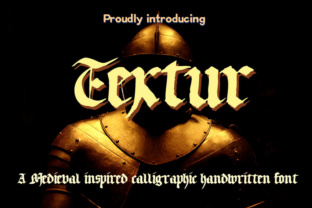
Typography is the voice of your design. It speaks before a single word is read, setting the tone, establishing authority, and evoking emotion. Among the vast library of typefaces available to modern designers, Textur stands out as a distinctive choice for those seeking to inject historical gravitas and artistic flair into their projects. This beautiful blackletter font captures the essence of medieval calligraphy while offering an upright appearance that makes it surprisingly versatile for contemporary applications.
If you are looking to add tons of style and character to your work, Textur is more than just a decorative option; it is a strategic tool. However, using a font with such strong visual weight requires a nuanced approach. Many creators overlook the specific contexts where blackletter thrives versus where it fails, leading to designs that feel cluttered or inaccessible. Understanding the nuances of Textur can help you avoid these pitfalls and create work that is both aesthetically striking and functionally effective.
Understanding the Appeal of Blackletter in Modern Design
Textur is a hallmark of typography from the Middle Ages, specifically designed to mimic the dense, intricate strokes of Gothic script. Its appeal lies in its ability to instantly transport viewers to a different era. Whether you are designing a logo for a craft brewery, a poster for a heavy metal concert, or a menu for a traditional German restaurant, Textur provides an immediate sense of heritage and authenticity.
For professionals and hobbyists alike, the upright structure of Textur offers a unique advantage. Unlike some cursive scripts that lean heavily to the right, Textur maintains a vertical stability that grounds the design. This characteristic allows it to serve as a powerful display font without overwhelming the layout, provided it is used correctly. It adds character without demanding constant attention, making it ideal for headlines, titles, and thematic accents rather than body text.
Common Misconceptions About Using Display Fonts
One of the most frequent mistakes beginners make when incorporating fonts like Textur is assuming that "more is better." Because blackletter is visually dense, there is a temptation to use it extensively throughout a document or website. This often results in a design that feels chaotic and difficult to parse. The human eye struggles to track long passages of highly stylized, high-contrast letterforms. When you prioritize style over readability, you risk alienating your audience and reducing the effectiveness of your communication.
Another common error is ignoring the contrast between the font and its background. Textur features sharp angles and thick, bold strokes. If placed on a busy or low-contrast background, the letters can merge together, creating a muddy visual experience. To maintain clarity, it is essential to pair Textur with ample white space and clean, simple backgrounds. This negative space acts as a frame, allowing the intricate details of the font to breathe and stand out.
Strategic Applications for Textur
To get the most out of this typeface, consider its role within your overall design hierarchy. Textur should be treated as an accent, not a foundation. Here are several practical ways to integrate it effectively:
- Headlines and Titles: Use Textur for main headings to grab attention. Its bold presence will draw the eye immediately, setting the thematic stage for the content below.
- Logos and Branding: For brands that want to convey tradition, craftsmanship, or rock-and-roll edge, Textur can be a powerful logo element. Ensure the logo remains legible at smaller sizes by testing it across various media.
- Themed Projects: From Halloween invitations to fantasy book covers, Textur fits seamlessly into projects that require a specific atmospheric tone. It helps establish a narrative context before the reader even begins.
- Accents and Pull Quotes: Highlight key phrases or pull quotes using Textur to break up sections of plain text. This creates visual interest and guides the reader’s focus.
By limiting the use of Textur to these strategic points, you ensure that its impact is maximized. The rest of your design can rely on clean, sans-serif or serif fonts to handle the bulk of the information delivery. This balance between ornate and functional is key to professional-quality design.
Evaluating Usability and Accessibility
Before downloading or purchasing Textur, it is crucial to evaluate its usability in your specific project. Not all blackletter fonts are created equal. Some may have poor kerning (the spacing between letters), which can cause characters to collide awkwardly. Others might lack the necessary ligatures or alternate glyphs that make the font look authentic and polished.
Accessibility is another critical factor. While Textur is visually appealing, it may not be suitable for users with dyslexia or other reading difficulties. If your target audience includes a broad demographic, including those with visual impairments, relying solely on Textur for important information is a poor decision. Always provide alternative text or use standard fonts for any content that needs to be easily readable by everyone.
Additionally, consider the technical aspects of implementation. If you are using Textur on a website, ensure that the font file is optimized for fast loading times. Heavy, complex fonts can slow down page speeds, negatively impacting user experience and SEO rankings. Web-safe alternatives or well-compressed web fonts can help mitigate these issues.
Comparing Textur to Similar Typefaces
When selecting a blackletter font, you may encounter several similar options. It is helpful to compare Textur against others in its category to determine which best fits your needs. Look for differences in stroke width, x-height, and overall density. A font that is too dense may become illegible at smaller sizes, while one that is too sparse may lose the dramatic effect you are aiming for.
Take time to test different fonts in your actual design environment. Mockups can reveal subtle issues that are not apparent when viewing the font in isolation. Does Textur complement your chosen color palette? Does it clash with your existing imagery? These questions are vital for ensuring cohesion in your final product.
Best Practices for Integration
To avoid common pitfalls, follow these best practices when working with Textur:
- Pair Wisely: Combine Textur with simple, neutral fonts for body text. A clean sans-serif like Helvetica or a classic serif like Garamond can provide a perfect counterpoint to the complexity of Textur.
- Control Size: Avoid using Textur in small sizes. It is designed to be seen, not squinted at. Keep it large enough to appreciate its details.
- Limit Color Palettes: Stick to monochromatic or limited color schemes when using Textur. Too many colors competing with the font’s intricate shapes can create visual noise.
- Check Licensing: Ensure you have the proper license for your intended use. Commercial projects often require different licensing terms than personal ones. Ignoring this step can lead to legal issues and unexpected costs.
By approaching Textur with respect for its historical roots and practical limitations, you can harness its power to create designs that are both beautiful and effective. It is a font that demands attention, so give it the space and context it deserves. When used thoughtfully, Textur transforms ordinary layouts into memorable experiences, adding a layer of sophistication and character that resonates with audiences on a deeper level.
Remember, good design is about balance. Let Textur shine as the star of the show, but support it with solid structural choices. This synergy between style and substance is what separates amateur attempts from professional-grade typography. Embrace the elegance of the Middle Ages, but apply it with the precision of a modern creator.